
ThinkDiag+
THINKCAR TECH CO., LTD,Auto & Vehicles
4.3730.00 Reviews
- Version
- 3.3.0
- Installs
- 1.00M
- Age Rating
- Everyone
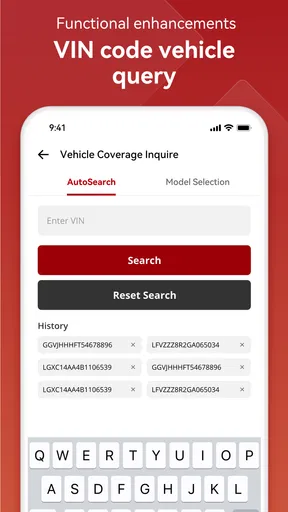
Screenshots
Our Review of ThinkDiag+
 Analysis by Appyee
When a warning light appears on a dashboard, the hardest part is often not seeing it but understanding what it means. ThinkDiag+ is an Android and iOS vehicle-diagnostic app from THINKCAR TECH CO., LTD, designed to work with compatible diagnostic hardware so a driver can investigate fault information instead of guessing. I see it as a practical tool for people who want a clearer first look before deciding whether a workshop visit is urgent.
The app is free to install, aimed at Everyone, and belongs to the Auto & Vehicles category. It has built a sizeable audience, with over a million installs and an average rating of 4.3 from around eleven thousand ratings. Those figures suggest that it is not a niche experiment, but they do not remove the need to understand how diagnostic apps behave in real situations: the phone, the vehicle, the adapter, and the user’s interpretation all matter.
What ThinkDiag+ is really useful for
My first impression is that this is not meant to replace a trained mechanic. Its value is in turning an intimidating warning light into information that can guide the next decision. If the engine light appears on the way to work, a scan may help you distinguish between a problem that needs immediate attention and one that can be discussed calmly with a repair shop. That distinction is useful even when the app cannot provide the complete answer on its own.
The experience depends on compatible diagnostic equipment, so installing the app alone does not magically turn a phone into a complete workshop scanner. This is the most important practical point to understand before downloading it. The software is the interface and interpretation layer; the vehicle connection is what allows it to read the car. Anyone expecting a phone-only scan will probably be disappointed.
Once the connection is ready, the app’s purpose becomes straightforward. You select the vehicle information as required, establish communication, and inspect the results. I would approach the process slowly the first time, checking that the ignition state and vehicle selection are correct rather than tapping through the setup just to reach the scan screen. A wrong vehicle choice can make later information harder to trust.
Speed expectations during an ordinary scan
ThinkDiag+ feels most useful when I treat it as a focused diagnostic session rather than an always-running companion. The perceived speed is influenced by several steps outside the app itself: opening the connection, waking the vehicle electronics, identifying the vehicle, and waiting for modules to respond. A scan is therefore not comparable to opening a calculator or messaging app.
For a simple check, the workflow should feel reasonably direct once the hardware is connected and the vehicle details are ready. The app’s strongest speed advantage is practical rather than spectacular: it can put diagnostic information in your hands without first arranging a workshop appointment. That can save time when the goal is simply to decide whether to stop driving, keep an eye on the vehicle, or book professional help.
I would not judge it by the first few seconds alone. Vehicle communication can take longer than expected, particularly when multiple systems are involved or the car is older. If a scan seems slow, I would first check the physical connection, ignition position, phone connection, and vehicle selection before assuming that the application has frozen. This simple habit prevents unnecessary restarts and repeated scans.
There is also a useful difference between reading a fault and understanding it. A fast code display is not automatically a good diagnosis. The meaningful part is reviewing the code in context, considering symptoms, and deciding what should happen next. ThinkDiag+ can shorten the information-gathering stage, but it does not eliminate the reasoning stage.
When heavier use changes the experience
The demanding moments come when a user moves beyond one quick check. Repeated scans, switching between vehicle systems, or keeping the phone active while working around the car can make the session feel more involved. I would avoid treating the app like a background utility that can be left open indefinitely. A deliberate scan, followed by saving or noting the relevant results, is a cleaner workflow.
A realistic example is a driver who notices an engine warning light after filling up. Instead of clearing the light immediately, I would connect the diagnostic hardware, run the scan, record the code, and observe whether the vehicle shows other symptoms such as rough running or reduced power. If the car behaves badly, the scan should support a safety decision, not encourage continued driving. If it behaves normally, the information can make a conversation with a mechanic more precise.
Another useful scenario is checking a used car before purchase. Here, the app can be more valuable as part of a broader inspection than as a final verdict. I would scan before a test drive, pay attention to warning indicators, and then scan again after driving if the seller agrees. A clean-looking result should not be treated as proof that the vehicle is perfect, because diagnostic history and mechanical condition are not the same thing.
Heavy use also exposes a trade-off: the more systems you investigate, the more important your notes become. It is easy to collect codes without remembering which appeared first, which returned after clearing, or which were merely stored. I recommend photographing important screens or writing down the exact code and symptoms before making changes. That small step gives a repair shop something more useful than “the app said there was a problem.”
Stability and recovering from an interrupted session
In a vehicle environment, reliability is not only about whether the app opens. It is about whether the connection remains understandable while the car, adapter, phone, and ignition are all involved. My preferred approach is conservative: keep the phone charged, avoid unnecessary app switching, and do not disconnect the hardware while a scan or communication process is active.
If a session stops responding, I would recover in stages rather than repeatedly pressing buttons. First, I would wait briefly and check whether the vehicle is still in the correct ignition state. Next, I would inspect the adapter connection and phone connection. If needed, I would close and reopen the app, reconnect carefully, and begin a fresh scan. The goal is to separate a communication interruption from a genuine vehicle fault.
That recovery process matters because a failed scan can create confusion. A partial result is not the same as a confirmed clean vehicle, and an interrupted reading should not be interpreted as a new fault without context. I would record when the interruption happened and whether any warning lights changed afterward.
The app’s rating of 4.3 across around eleven thousand ratings gives me some confidence that many users find the overall experience workable, but ratings cannot guarantee identical results across every phone, vehicle, or adapter. Diagnostic compatibility is inherently more variable than using a general-purpose app. For that reason, I value a careful workflow more than a promise of flawless one-tap operation.
Phone and vehicle constraints to consider
The current version is 3.3.0, and it supports devices running Android 5.0 or later. That minimum makes the app accessible to many older Android phones, although compatibility in practice can still depend on the specific phone, its wireless behavior, and the diagnostic hardware being used. I would choose a reasonably dependable phone rather than an old spare with an unreliable battery or unstable connection.
On iOS, the same general principle applies: the operating system is only one part of the setup. The vehicle and connection hardware remain central. Before relying on the app for a long trip or a purchase inspection, I would test the complete combination at home. A short test can reveal whether the adapter communicates properly and whether the phone is comfortable to use near the vehicle.
Resource demands are best understood in practical terms. A diagnostic session may keep the screen active and maintain a connection, so battery consumption can matter more than it would for a quick reference app. I would start with a well-charged phone and, for longer work, keep a power source nearby. I would also avoid placing the phone where it can fall into the footwell or interfere with driving controls.
The app is free, which lowers the barrier to trying it, but “free” should not be confused with a complete no-cost diagnostic setup. The necessary compatible hardware is part of the real experience, and a user should account for that before deciding whether this is cheaper than another scanning method. If you already own the right equipment, the value proposition is much stronger than if you are starting from nothing.
There is a second constraint that is easy to overlook: diagnostic information can be technical. A code may identify a system or circuit without explaining the failed component. I would never replace a part solely because a code points in its direction. Checking wiring, connectors, fluid levels, battery condition, and related symptoms may still be necessary, and safety-critical problems deserve professional attention.
How it compares with familiar alternatives
The usual alternative is visiting a mechanic or parts retailer for a scan. That option has a clear advantage: a professional can combine the code with experience, physical inspection, and workshop equipment. ThinkDiag+ is better when you want access at home, need to check a recurring warning, or want to arrive at a repair appointment with more useful background.
A basic standalone code reader can be simpler because it avoids relying on a phone screen and app workflow. For someone who only wants a quick code display and dislikes pairing or account-style setup, a dedicated reader may feel more direct. ThinkDiag+ becomes more appealing to users who prefer a guided phone interface and want to keep diagnostic information in a familiar device.
Generic vehicle apps that estimate maintenance costs or provide reminders serve a different purpose. They may help organize ownership, but they do not replace a connection to the car’s diagnostic system. ThinkDiag+ is the more relevant choice when the immediate question is “what is the vehicle reporting?” rather than “when should I change the oil?”
Professional scan tools remain the better choice for workshops and advanced technicians who need broad coverage, deep testing, and a dependable working routine across many vehicles. I would not recommend this app as the sole tool for a repair business simply because it is free to download. For a private owner, however, its lower entry point can be sensible when expectations are realistic.
Small workflow choices that improve the result
I would begin by identifying the exact symptom before connecting anything. Note when the warning appeared, whether it is constant or intermittent, and whether the car feels different. This gives the scan a purpose and helps prevent the common mistake of treating every stored code as equally urgent.
Next, I would scan before clearing. Clearing codes can remove useful context and may make it harder to show a mechanic what happened. If a warning returns, the repeated appearance is often more informative than the first isolated reading. Keeping a simple record of the date, symptoms, and code creates a basic history that the app itself cannot replace.
For a used-car inspection, I would avoid relying on a single result taken immediately after the vehicle has been prepared for sale. A test drive, a second look at the dashboard, and an independent mechanical inspection remain important. The app is most powerful here as a screening tool that helps you ask better questions, not as a certificate of condition.
Finally, I would treat any result involving brakes, steering, airbags, overheating, or severe engine behavior as a reason for caution. A diagnostic app can help identify information, but it cannot make an unsafe vehicle safe. If the car is difficult to control, losing power, smoking, overheating, or showing multiple serious symptoms, professional assistance is the appropriate next step.
Who should use it, and who should skip it
I think ThinkDiag+ suits private drivers who want more control over routine troubleshooting, used-car shoppers who understand the limits of electronic scans, and hobbyists who are comfortable following a careful connection process. It is also useful for someone who wants to communicate more clearly with a repair shop instead of arriving with only a dashboard symbol.
I would skip it if you expect the phone alone to diagnose every problem, if you do not want to purchase or handle compatible hardware, or if you are looking for a completely automatic explanation of every fault. It is also not the right substitute for professional equipment when the vehicle has complex, safety-related, or intermittent problems that require physical testing.
For older phones, the Android minimum of 5.0 is encouraging, but I would still test performance and connectivity before depending on the app. A phone that technically meets the requirement may not provide a comfortable experience during a long diagnostic session. The same advice applies to anyone planning to use it far from home: test first, charge the device, and keep a backup plan.
My performance verdict
After looking at the complete workflow, I see ThinkDiag+ as a useful bridge between a dashboard warning and a professional diagnosis. Its speed is adequate for purposeful checks, though connection steps and vehicle communication can shape the experience more than the app interface itself. Its resource demands are manageable with a charged phone and a sensible session, while recovery is easiest when the user avoids rushing and checks the physical connection first.
The strongest benefit is not that it promises instant answers. It is that it can make an unknown warning less mysterious and help a driver make a better next decision. The main limitation is equally important: the app depends on compatible hardware and user judgment, and a fault code is evidence to investigate rather than a complete repair instruction.
With its free entry point, Everyone age rating, broad install base, and support for Android devices from version 5.0 onward, I consider it worth trying for the right owner. I would recommend ThinkDiag+ to a careful driver who wants accessible vehicle information and is willing to learn the basics of scanning. I would not recommend it as a replacement for a mechanic or a professional workshop scanner. Used within those boundaries, it is a practical diagnostic companion rather than a misleading promise of one-click certainty.
Verdict
Strengths of ThinkDiag+
- Supports advanced diagnostics for many vehicle brands.
- Offers bidirectional tests on compatible car systems.
- Compact design makes it easy to carry and use anywhere.
- Provides access to service functions beyond basic code reading.
- Works with Android and iOS devices through a wireless connection.
Limitations of ThinkDiag+
- Many advanced features require separate in-app purchases.
- Vehicle coverage and functions vary significantly by model and year.
- An active subscription may be needed for continued access to services.
- The app can feel complex for users without diagnostic experience.
- Connection or scan issues may occur with some vehicle adapters.
Other Releases by THINKCAR TECH CO., LTD,
View All
Ediag
Auto & Vehicles4.0
Similar Picks in This Category
View All
Android Auto
Google LLC4.1

maxim — order a taxi & food
PT. SITO4.7

Штрафы ГИБДД: проверка с фото
Pays LLC – Штрафы ГИБДД4.7

Номерограм – проверка авто
Авто Ассист4.8

Дром Авто
Дром4.9

Frequently Asked Questions
What is ThinkDiag+ and what can it do?
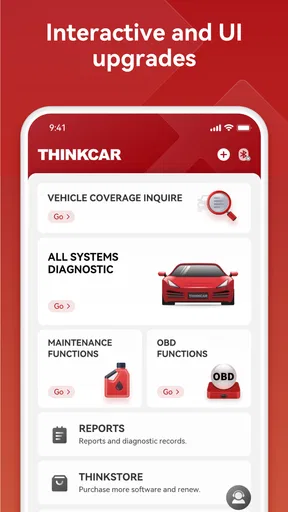
ThinkDiag+ is a mobile diagnostic application designed to work with compatible THINKCAR ThinkDiag hardware. After connecting the adapter to a vehicle and pairing it with an Android or iOS device, the app can read and clear diagnostic trouble codes, display live data, perform selected service resets, and access manufacturer-specific functions. Its exact capabilities depend on the vehicle model, adapter, software package, and active subscription.
Is ThinkDiag+ compatible with my vehicle and smartphone?
Compatibility should be checked before downloading or purchasing any diagnostic package. ThinkDiag+ supports many vehicles, but coverage varies by manufacturer, model, year, engine, and electronic control unit. The app generally requires a compatible ThinkDiag adapter, Bluetooth-enabled Android or iOS device, and a supported operating system. Some advanced functions may not be available on every vehicle, even when basic OBD diagnostics work.
Does ThinkDiag+ require a subscription or additional purchases?
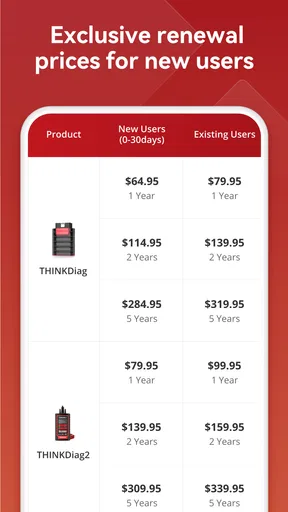
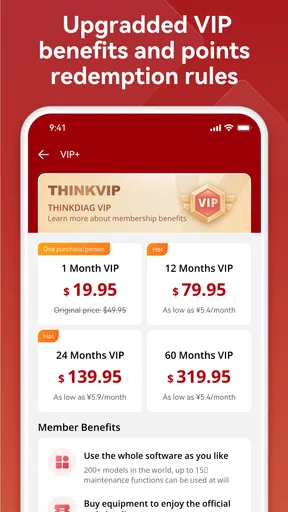
ThinkDiag+ may provide basic functions through the adapter, but many manufacturer-specific diagnostics, advanced service procedures, and special functions require separate software activation or a subscription. Pricing and available packages can change by region and promotion. Before completing a purchase, review the vehicle coverage, license duration, renewal terms, and included functions carefully, because buying the adapter alone may not unlock every feature shown in the application.
Can ThinkDiag+ perform coding, adaptations, or service resets?
The application can support functions such as oil service resets, battery registration, electronic parking brake service, steering-angle calibration, diesel particulate filter procedures, throttle relearning, and other maintenance operations on selected vehicles. Some versions and vehicle combinations may also offer coding or adaptations. These features are not universal, however, and users should follow the on-screen instructions carefully because an interrupted or incorrect procedure can affect vehicle operation.
Is ThinkDiag+ suitable for beginners, and is it safe to use?
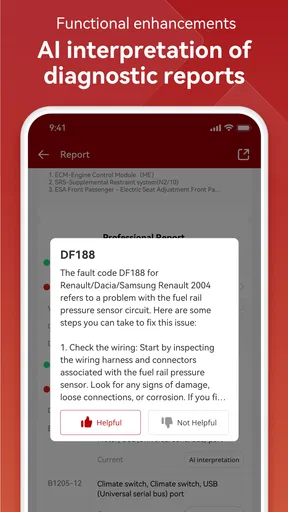
ThinkDiag+ is more approachable than many professional scan tools because its mobile interface provides guided menus, fault-code descriptions, reports, and live readings. Nevertheless, it is not completely risk-free for inexperienced users, especially when using bidirectional controls, coding, or module programming-related functions. Beginners should start with code reading and data viewing, keep the vehicle battery well charged, and consult a qualified technician before changing settings they do not understand.
